Educational robots for kids aged 8–12: four ways to learn
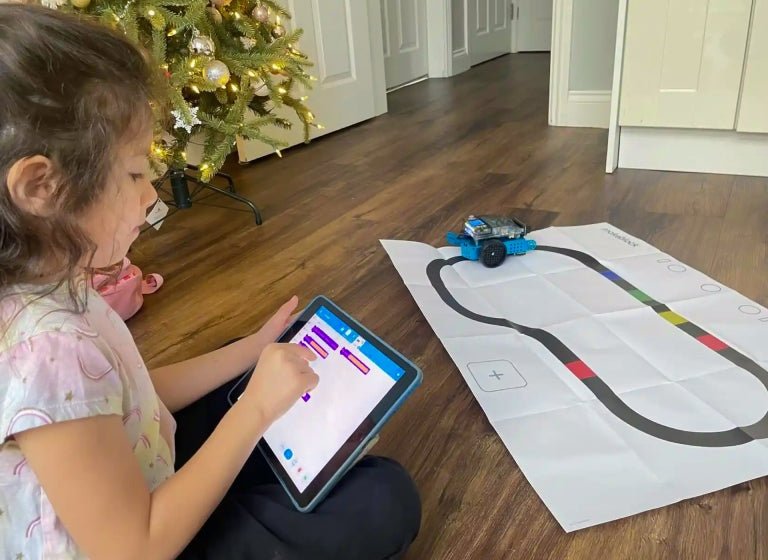
A good educational robot for ages 8–12 should support the next activity, not just an impressive first demonstration. Consider Clementoni Mio for shared assembly on a smaller budget, Sphero Mini for coding a small ball, Sphero indi for screen-free routes, or Makeblock mBot2 for building and progressing from blocks towards Python.
Sources checked 29 October 2026. By RoboMorrow Editorial. Recommendations are based on manufacturer documentation, not physical testing or invented performance scores.
Four robots, four learning routes
| Robot / configuration | Useful starting point | Prepare first | Main limitation |
|---|---|---|---|
| Clementoni Mio 50632 | Shared assembly and basic movement sequences; manufacturer age 8+ | Building time, instructions and the correct power supply | Not automatically a platform for progressing to Python |
| Sphero Mini | Short movement projects using drawing, blocks and later JavaScript | A compatible device and Sphero Edu | A small ball does not provide chassis-building experience |
| Sphero indi, one-robot kit | Routes made with coloured tiles, without a screen | Floor or table space and the right tile set | An older child already comfortable with blocks may need harder challenges |
| Makeblock mBot2 / Neo | Assembly, sensors, block coding and Python; manufacturer age 8+ | Adult setup time, coding tools and a compatible device | More cost and configuration than a simple toy |
These are four selected approaches, not a complete ranking of the market. Their order is not a test result. One child may value assembling a mechanism; another may enjoy repeatedly rebuilding a screen-free route. A count of features will not resolve those different preferences.
For an eight-year-old, plan one achievable first task
Choose a small first-weekend goal: follow a route, stop before an obstacle or reach a coloured tile. The child should influence the result. If an adult performs every step and the recipient only watches the demonstration, simplify the activity until there is a meaningful decision for the child to make.
An 8+ label is the manufacturer’s guidance for a particular product, not a promise that every eight-year-old can use it independently. Consider willingness to build, confidence reading instructions and the adult time available. Younger siblings and detachable parts may also influence where the kit is used and stored.
Clementoni Mio: a smaller-budget building project
For model 50632, Clementoni describes assembly, route programming through buttons on the robot’s back, infrared sensing and response to clapping. A free app adds control and block programming. Construction and simple sequences can therefore be the initial activity, with app-based features considered separately.
The Polish 50632 offer checked on 29 October was PLN 119, approximately EUR 29.75 using RoboMorrow’s editorial convention of PLN 4 = EUR 1. That is context from a Polish offer, not a live exchange rate or a delivered quote for your country. Check your local edition, instructions, required batteries or power supply, and delivery costs. Similar Mio names do not prove identical accessories or software.
Suggested activity: make a route between three paper markers. Ask the child to describe the movement sequence, run it and change one step. The goal is understanding a sequence, not a speed contest or a claim of measured positioning accuracy.
Sphero Mini: less assembly, more movement experiments
Sphero Mini supports Draw, Blocks and Text programming in Sphero Edu, with JavaScript in the text route. Sphero Play is a different app: remote control alone is not the same as writing a program. Before buying, check the current app’s compatibility with the actual phone, tablet or computer the child will use.
The small ball is convenient for short projects, but it does not replace building a chassis or attaching sensors. Its shell has detachable parts, so follow the maker’s guidance and consider younger children sharing the room. The manufacturer calls for supervision for children under eight.
Suggested activity: mark a start line and target with tape. Change speed or time in one place in the program. Have the child record a prediction and the result. Introduce a different surface only after understanding the first one; otherwise it becomes difficult to explain which change affected the movement.
Sphero indi: choose it for physical, screen-free sequences
indi responds to coloured tiles, while Sphero Edu Jr can change responses through the app. Without a screen, children can build sequences, predict a route and revise it. For a family wanting shared floor play, this is a different starting point from coding on a computer.
indi is also aimed at younger learners. Within the 8–12 age range, we suggest it primarily for beginners who enjoy this physical approach. A ten-year-old already building block-based projects may need a more open-ended coding platform. Check the bundle carefully: Student Kit, At-Home Learning Kit and a classroom pack are different purchases.
Suggested activity: one person builds a route with a deliberate mistake. The other predicts what will happen, then changes just one tile. Make the task harder by limiting the available tiles before assuming that adding a screen is the necessary next step.
mBot2: for a child who wants to develop a project
Makeblock presents mBot2 as an 8+ kit with a CyberPi controller, sensors and progression from block coding to Python. The manufacturer says mBot Neo has the same functionality as mBot2, with packaging differences. Still compare the actual parts list: an AI camera extension, Rover configuration and basic mBot2 are not interchangeable bundles.
The Polish NeoRobot offer for P1010132 showed PLN 899 including tax on 29 October: approximately EUR 224.75 under the same editorial PLN 4 = EUR 1 convention. It is not a local EUR offer. The lower PLN 730.89 amount is a net price, which should not be compared with a consumer total. Makeblock’s US offer states contiguous-US shipping; use a suitable local distributor for other destinations.
Suggested activity: after assembly, build a program that stops before an obstacle, then compare two response thresholds. An adult can help launch the tools while the child decides how to change behaviour. Move to Python when blocks constrain a real idea, rather than because the word is printed on the box.
For ages ten and twelve, experience matters more than the birthday
Ask what the child has already built. If sequences and loops are familiar, the next purchase should introduce a new problem: a sensor reading, a condition, a measurement or a behaviour to improve. If they have not programmed before, a simpler starting point remains sensible. A more expensive kit without a first-session plan can become a difficult gift to use.
Do not choose Eilik or EMO solely because they have expressive faces and are described as AI. They address a different kind of interaction. Our Eilik vs EMO comparison explains that distinction. The wider robot gift guide includes alternatives for other recipients and activities.
Check these before ordering
- Choose one initial activity and identify who will help with setup.
- Verify the exact kit number, contents, instruction language and age guidance.
- Check the required app against the device you own, rather than assuming any tablet will work.
- Compare the tax-inclusive delivered total, including power requirements and essential accessories.
- Confirm arrival for the destination; dispatch within 24 hours does not mean next-day delivery.
Parents’ questions
Which is the lower-budget option here?
Mio 50632 had the lowest checked local offer in this selection. It is an entry to building and sequences, not a promise of an entire Python curriculum. Check your country’s edition and delivered price.
Which can be used without a screen?
indi supports routes using coloured tiles without the app. Mio also offers button-based control for some activities; app functions are a separate stage. Choose the activity the child actually wants to repeat.
Does Sphero Mini teach Python?
The documented text route in Sphero Edu uses JavaScript. mBot2 provides the Python route compared here. Different programming languages should not be presented as the same feature.