PUDU CC1 vs CC1 Pro: what does cleaning feedback add?
BUYING IN YOUR MARKET
Availability in your country
Sales, delivery and support can differ by country and exact model. Choose your market to see the evidence we have checked.
PUDU CC1
United States
Local sales channel — request a quote
- Seller / sales channel
- Inland Global
- Price
- Individual quote; no verified public local price
- Delivery
- Confirm stock and the delivery date for your address with the seller
- Warranty and service
- Confirm written warranty terms, parts and service coverage for your address
Inland Global lists this model in its US sales catalogue with a quotation route. Confirm the exact configuration and fulfilment before payment.
Evidence checked: · Not a live stock feed
Inland Global: request a quote ↗Germany
Local sales channel — request a quote
- Seller / sales channel
- JK Robotik
- Price
- EUR 18,950 excluding VAT and shipping
- Delivery
- Confirm stock and the delivery date for your address with the seller
- Warranty and service
- Confirm written warranty terms, parts and service coverage for your address
JK Robotik lists this exact model for this market. A listing is evidence of a buying route, not a delivery commitment.
Evidence checked: · Not a live stock feed
JK Robotik: request a quote ↗Netherlands
Local sales channel — request a quote
- Seller / sales channel
- Fulin Robots
- Price
- See the linked offer for the current price, configuration and taxes
- Delivery
- Confirm availability and delivery to your address with the seller
- Warranty and service
- Confirm warranty territory, local service and return shipping with the seller
This supplier lists the exact model. Request a written offer with the exact configuration, delivery date and service coverage.
Evidence checked: · Not a live stock feed
Fulin Robots: model offer ↗Spain
Local sales channel — request a quote
- Seller / sales channel
- Intec Robots
- Price
- See the linked offer for the current price, configuration and taxes
- Delivery
- Confirm availability and delivery to your address with the seller
- Warranty and service
- Confirm warranty territory, local service and return shipping with the seller
This supplier lists the exact model. Request a written offer with the exact configuration, delivery date and service coverage.
Evidence checked: · Not a live stock feed
Intec Robots: model offer ↗Portugal
Local sales channel — request a quote
- Seller / sales channel
- Intec Robots
- Price
- See the linked offer for the current price, configuration and taxes
- Delivery
- Confirm availability and delivery to your address with the seller
- Warranty and service
- Confirm warranty territory, local service and return shipping with the seller
This supplier lists the exact model. Request a written offer with the exact configuration, delivery date and service coverage.
Evidence checked: · Not a live stock feed
Intec Robots: model offer ↗No verified local offer in this dataset
No country-specific offer for this exact model has been established in our current sources. This is a gap in our research, not a statement that the robot cannot be bought here. Use the manufacturer’s sales contact to request a supplier serving your address; confirm configuration, imports, warranty and service.
- Price
- No verified local price in this dataset
- Delivery
- No confirmed date for your address
- Warranty and service
- Local coverage not verified
PUDU CC1 Pro
United States
Local sales channel — request a quote
- Seller / sales channel
- Inland Global
- Price
- Individual quote; no verified public local price
- Delivery
- Confirm stock and the delivery date for your address with the seller
- Warranty and service
- Confirm written warranty terms, parts and service coverage for your address
Inland Global lists this model in its US sales catalogue with a quotation route. Confirm the exact configuration and fulfilment before payment.
Evidence checked: · Not a live stock feed
Inland Global: request a quote ↗Germany
Local sales channel — request a quote
- Seller / sales channel
- JK Robotik
- Price
- EUR 20,950 excluding VAT and shipping
- Delivery
- Confirm stock and the delivery date for your address with the seller
- Warranty and service
- Confirm written warranty terms, parts and service coverage for your address
JK Robotik lists this exact model for this market. A listing is evidence of a buying route, not a delivery commitment.
Evidence checked: · Not a live stock feed
JK Robotik: request a quote ↗Netherlands
Local sales channel — request a quote
- Seller / sales channel
- Fulin Robots
- Price
- See the linked offer for the current price, configuration and taxes
- Delivery
- Confirm availability and delivery to your address with the seller
- Warranty and service
- Confirm warranty territory, local service and return shipping with the seller
This supplier lists the exact model. Request a written offer with the exact configuration, delivery date and service coverage.
Evidence checked: · Not a live stock feed
Fulin Robots: model offer ↗Spain
Local sales channel — request a quote
- Seller / sales channel
- Intec Robots
- Price
- See the linked offer for the current price, configuration and taxes
- Delivery
- Confirm availability and delivery to your address with the seller
- Warranty and service
- Confirm warranty territory, local service and return shipping with the seller
This supplier lists the exact model. Request a written offer with the exact configuration, delivery date and service coverage.
Evidence checked: · Not a live stock feed
Intec Robots: model offer ↗Portugal
Local sales channel — request a quote
- Seller / sales channel
- Intec Robots
- Price
- See the linked offer for the current price, configuration and taxes
- Delivery
- Confirm availability and delivery to your address with the seller
- Warranty and service
- Confirm warranty territory, local service and return shipping with the seller
This supplier lists the exact model. Request a written offer with the exact configuration, delivery date and service coverage.
Evidence checked: · Not a live stock feed
Intec Robots: model offer ↗No verified local offer in this dataset
No country-specific offer for this exact model has been established in our current sources. This is a gap in our research, not a statement that the robot cannot be bought here. Use the manufacturer’s sales contact to request a supplier serving your address; confirm configuration, imports, warranty and service.
- Price
- No verified local price in this dataset
- Delivery
- No confirmed date for your address
- Warranty and service
- Local coverage not verified
“Listed” confirms a product page or sales route, not stock, delivery to every address or local service. “Pre-order” is not immediate availability. Unverified means we lack evidence; it does not mean unavailable. Prices belong to the named market and currency. Confirm the exact version, tax, shipping and support before ordering.
Compare PUDU CC1 Pro with CC1 through dirt detection and result checking, rather than the newer name alone. Automated inspection could matter where a site needs documented acceptance. First establish which problems it detects on your floor and what happens after detection.
In this guide
- What Pro adds to the assessment
- What a coverage number cannot establish
- Testing the feedback system
- When the upgrade could have operating value
- Test whether the camera reduces manual inspection
- An acceptance record for the inspection system
- When a simpler process may be enough
- What to request in the quotation
- Next step

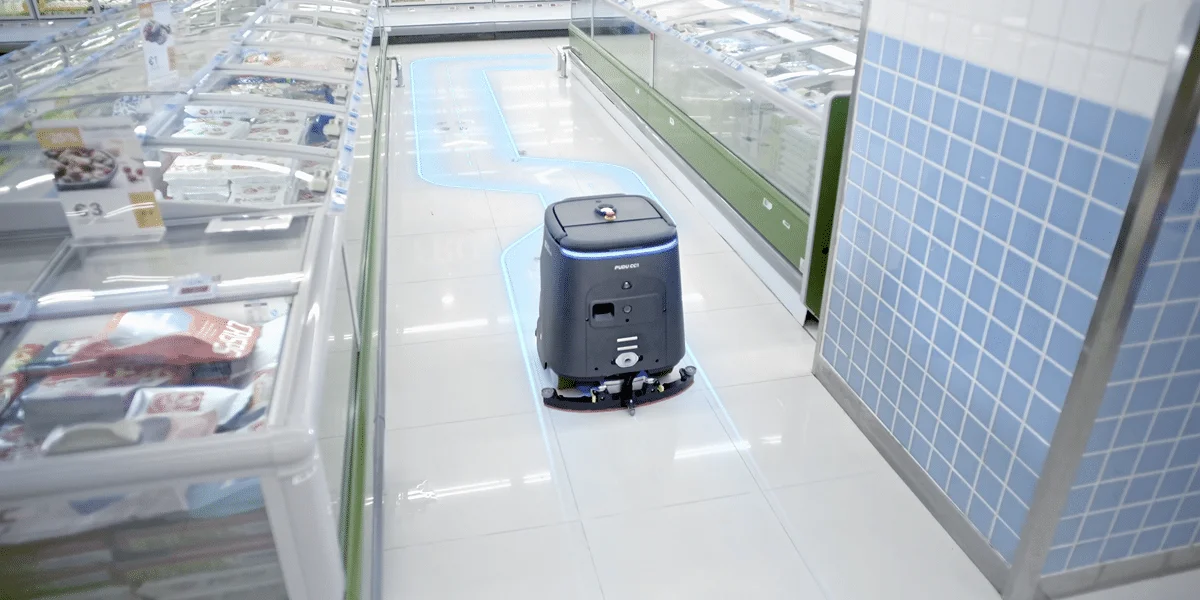
Buying update: 21 September 2026. Featured image: PUDU CC1 Pro. Manufacturer imagery, not a RoboMorrow test photograph. Image source.
When is the CC1 Pro premium justified?
A premium should address a measurable problem: missed dirt, inspection effort or repeat cleaning. PUDU describes a rear camera on CC1 Pro that evaluates cleaning results and initiates another pass over recognised residual marks. That is a feature claim, not proof that human inspection becomes unnecessary at every facility.
| Check | Evidence | Interpretation trap |
|---|---|---|
| Residual marks | A nominated person's floor assessment and the robot's response log | Treating the machine's own report as independent acceptance |
| Repeat passes | Count, duration and impact on route completion | Assuming more retries always mean a better result |
| Inspection | Actual inspection and rework minutes | Removing all inspection costs without measurement |
Set a premium threshold from your own evidence
Compare the additional purchase and running cost with avoided rework over the chosen period. Use a cautious result from several ordinary shifts, not the best demonstration. If quality improves without reducing cash expenditure, describe the benefit as quality or staff capacity. It can matter substantially without being a cash-payback claim. Keep all amounts in EUR on a consistent tax basis.
Different modes are not interchangeable throughput figures
Pro's stated spot-cleaning rate describes a different workflow from a complete area-cleaning pass. Ask for results using the same definition of accepted area and elapsed process time. Establish whether clean sections were skipped or cleaned in another mode, and which areas were independently inspected.
Request a demonstration of report export, history access and behaviour during a supplier-approved connectivity interruption. IT needs to know required connections, account permissions and remote-service access arrangements. Do not hand over a shared administrator password simply because it makes a demonstration easier.
When should you retain CC1?
If the standard model satisfies quality and timing requirements and the extra features do not reduce a demonstrated problem, the upgrade is not mandatory. Compare workstations, accessories and service separately. A Pro label does not compensate for missing local support. This is a decision framework, not evidence from a shared RoboMorrow trial.
Manufacturer sources checked on 21 September 2026; worksheets and purchasing conclusions are editorial analysis, not shared test results: puduCC1, cc1-pro.
Describe your deployment needs
Contacting RoboMorrow is not a sales offer or a guaranteed quotation. We do not claim authorised reseller status. Confirm price and local service with your supplier.
What Pro adds to the assessment
PUDU describes a rear AI camera for checking results, dirt detection, repeated cleaning and working-component checks on CC1 Pro. Standard CC1 also combines floor-cleaning functions; it should not be portrayed as a single-task machine. Both specifications list 15 L clean-water and 15 L waste-water tanks.
| Decision area | CC1 | CC1 Pro |
|---|---|---|
| Core job | Multifunction floor care | Multifunction floor care |
| Result checking | Check reporting and acceptance for the offered setup | Rear-camera AI result checking described by PUDU |
| Response to dirt | Verify available modes during demonstration | Detection and repeated cleaning described by PUDU |
| Water | 15 L clean / 15 L waste | 15 L clean / 15 L waste |
| Station and installation | The exact configuration belongs in the quotation | |
What a coverage number cannot establish
CC1 Pro’s page distinguishes full cleaning at 700–1000 m²/h from spot cleaning at 1500–3000 m²/h. Those are different tasks, so the figures do not promise that a whole floor will be washed three times faster. In either mode, measure accepted floor area and staff involvement.
Testing the feedback system
- Agree which ordinary dirt and floor types the deployment must handle.
- Inspect the same zones manually after the task, independently of the robot’s report.
- Record missed dirt and unnecessary repeat passes over already-clean areas.
- Check whether another pass improves the result and how much time it adds.
- Compare reporting, the physical finish and manual rework across several typical shifts.
When the upgrade could have operating value
Pro deserves particular attention where checking a large area is burdensome or staff frequently return to missed patches. With predictable flooring and dirt and a simple acceptance process, extra features might matter less than service, spare-parts availability or a well-prepared route.
Identify who receives alerts and understands the report. An automatic completion record does not replace an agreed cleanliness standard. The absence of a flagged problem does not prove that every surface was cleaned correctly.
Keep a short discrepancy log: zone, robot result, human observation, follow-up and time spent. That makes it possible to assess whether the feedback helps the team act or merely produces another dashboard to review.
Test whether the camera reduces manual inspection
Agree with the supplier on ordinary soiling suitable for the demonstration. After the pass, compare the system’s assessment with an independent inspection defined for the site. Two errors have different costs: missed dirt leaves work unfinished, while a false alert may trigger an unnecessary repeat and delay.
Calculation example: a test area contains 20 points requiring inspection. The system identifies 18 and also flags four places that the independent inspection considers clean. Detection of the relevant points is 18/20, or 90%. The proportion of correct alerts is 18/22, approximately 81.8%. These are invented inputs demonstrating the method, not CC1 Pro test results.
The figures describe different properties. High detection can coexist with many unnecessary repeats. Do not treat these example percentages as pass thresholds; the appropriate standard depends on the site, the cost of misses and the time available for corrections.
An acceptance record for the inspection system
| Field | Record | Use |
|---|---|---|
| Actual locations needing correction | Independent inspection list | Establish missed work |
| System alerts | Confirmed and unconfirmed locations | Assess alert usefulness |
| Repeat cleaning | Time and result afterwards | Assess the cost of reacting |
| Human work | Inspection, interventions and final corrections | Compare with the existing process |
When a simpler process may be enough
If an employee checks a small, predictable area while performing other duties, automatic inspection may recover little time. If staff repeatedly return to a large floor to find missed dirt, identifying inspection locations may be more valuable. Assess the work changed rather than the presence of a camera.
Ask what staff receive after a task, how long it remains available and whether exports contain the information your acceptance process needs. Reports, optional docking and integrations should be specified in the actual supplier offer.
What to request in the quotation
Name CC1 or CC1 Pro in full, including station equipment, installation conditions, training and an acceptance trial. Do not substitute CC1 Pro Disc. Ask for a sample report from an actual task and a description of situations requiring assistance. This connects the quoted cost with a specific improvement in your operating process.
Next step
Check how result inspection changes overnight operation and staff time.
Sources and method
Documentation checked on 11 September 2026. Model information comes from the manufacturer materials below. Checklists and worked examples are RoboMorrow editorial work, not results of our hands-on device tests. Confirm functions and equipment for the exact variant and market.